This is exactly what has been happening since May 10, 2026, as confirmed by BleepingComputer after independently verifying at least two active variants of the attack.
The Trick: The URL is Real, the Danger is Too
🔍 Suspicious message?
Analyze senders, links or files in real time with our scanner.
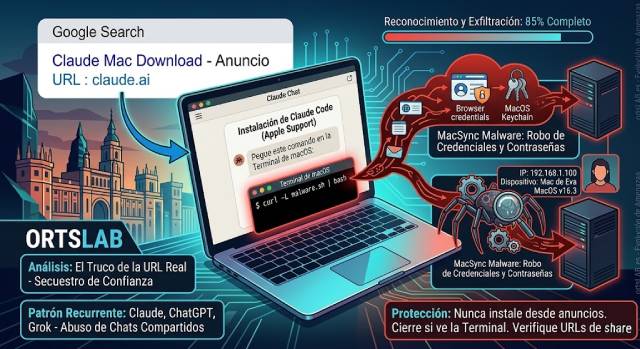
Attackers are publishing Google ads that list claude.ai as the destination domain. Upon clicking, the user arrives at a shared Claude chat presented as an official "Claude Code on Mac" installation guide, signed by none other than "Apple Support."
The chat instructs the user to open the macOS Terminal and paste a command. That command silently downloads and executes malware.
The key point of the attack is that there is nothing fake about the URL. The ad's domain is genuine because the malicious content is hosted within Claude's own shared chat feature. The standard advice of verifying the URL before clicking offers no protection here.
Step-by-Step: How the Attack Works
- The user searches for "Claude mac download" on Google.
- A sponsored ad appears with claude.ai as the visible destination.
- The link leads to a shared Claude chat with fake installation instructions, signed as "Apple Support."
- The chat asks the user to open the Terminal and paste a command.
- The command silently downloads and executes the malware.
What the Malware Steals
Two active variants have been identified using different infrastructures but the same social engineering method:
- MacSync Variant: Steals browser credentials, session cookies, and the contents of the macOS Keychain — the system's password vault. The data is exfiltrated directly to the attacker's server.
- Reconnaissance Variant: Before acting, it analyzes the machine — IP address, device name, macOS version, and keyboard configuration — to decide whether to proceed or abort based on the victim's profile.
Not an Isolated Case: The Pattern Repeats
The abuse of shared chats from AI platforms as a malware distribution vector has already been documented across Claude, ChatGPT, and Grok. This is not a one-off anomaly; it is a maturing pattern that evolves with each campaign.
Previously, attackers needed fake domains or imitation websites. This attack removes that weak link: there is no domain to inspect, and no typo to detect. The legitimate infrastructure serves as the perfect alibi.
How to Protect Yourself
- Never install software from a Google ad. Type the domain directly into the browser's address bar.
- Distrust any AI chat that asks you to execute commands in the Terminal, regardless of who is listed as the author or which platform hosts it.
- Check the full URL: Even if the domain is legitimate, check if it points to user-generated resources like
/share/or an external landing page. The correct domain does not guarantee correct content.
The Rule You Must Remember
The advice to "verify the domain before clicking" remains valid, but it is no longer enough. The new rule is simpler and more radical: no legitimate platform — not Claude, not Apple, nor Google — will ever ask you to paste a command into the Terminal to install anything. If you see that instruction, anywhere, it is malware. Close the tab.